Cizgen Tutor
Learn AutoCAD by doing.
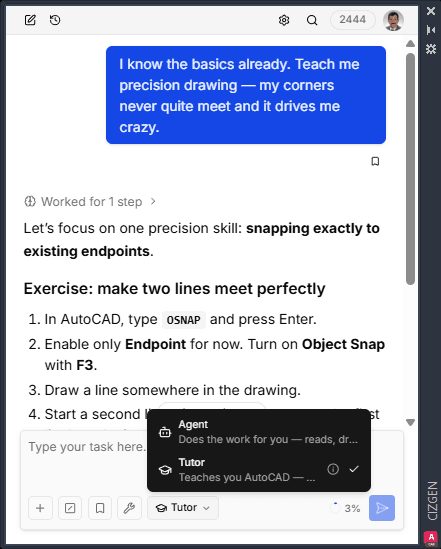
A tutor inside your AutoCAD panel: it gives you one task at a time, watches what you actually drew, and coaches you at the exact spot you went wrong — until you can do it yourself.
Included in the Cizgen panel · pay-as-you-go credits · switch modes anytime
Start learning in minutes
No course platform, no videos to follow along — your drawing is the classroom.
01
Install the plugin
Add the Cizgen plugin to AutoCAD and open the panel — the tutor lives right next to your drawing.
02
Switch to Tutor
Flip the Agent / Tutor selector under the message box. It stays on for the whole lesson — switch back anytime.
03
Say what you want to learn
“I’m new to AutoCAD” or “teach me blocks” — then draw in AutoCAD. The tutor checks your actual work and coaches from there.
It makes you draw
One small task at a time, Socratic hints before answers, harder steps as you improve. It only draws when you ask for a demo — this is practice, not a show.
It reads your drawing, not a screenshot
The tutor sees what changed since your last step — which commands you finished, what you added — and measures the result: a 3.2-unit gap at a corner doesn't slip by.
Feedback lands in the drawing
Mistakes come back as clickable links that zoom to and highlight the exact endpoint, line, or region in AutoCAD — not vague advice.
Frequently asked
What can it teach?
The ladder runs from absolute basics (the interface, your first line, coordinate entry) through precision drawing (OSNAP, ORTHO, layers) to editing, blocks, and dimensioning. You can also bring your own lesson list and it will follow that instead.
Does it see my screen or keystrokes?
No — and it tells you so. It reads the drawing itself: finished command names and the net changes to objects. When the process matters ("was OSNAP on?"), it asks you.
Can it draw for me?
When you ask — "show me an example" — it draws a demo through the same preview-and-approve gate as everything else in Cizgen. Nothing is committed without your approval.
What does it cost?
Tutor mode is part of the Cizgen panel — the same pay-as-you-go credits, no separate subscription. See how credits work.
Does it work in Claude Desktop over MCP?
The tutor’s curriculum ships as a skill there too (pick it from the prompt menu), but the one-click mode selector is a panel feature. See Cizgen MCP.